Custom Grids
Phone product photography: the grid setup for cleaner listings
A practical phone product photography workflow for cleaner listing images, readable labels, consistent margins, and repeatable shots across a whole catalog.
The fastest way to make phone product photos look less homemade is not a new phone. It is a repeatable frame. Put the product in the same place, keep the label square, leave the same amount of margin, and shoot the same angle again when the next SKU shows up.
A grid gives you that repeatability before you press the shutter. For product photos, the grid is not there to make the image artistic. It is there to make the product look intentional.
The shot you are really building
Most product photos have one job: make the thing clear enough that someone can recognize it, compare it, and trust it. That means your frame needs to solve four problems at once:
- Centering. The product should not drift left between one listing and the next.
- Squareness. Labels, boxes, and packaging should not lean unless the angle is intentional.
- Margin. The product needs breathing room for square thumbnails, 4:5 social crops, and product-page zoom.
- Repeatability. The second product needs to look like it came from the same shoot.
Default camera grids help a little, but rule of thirds is not built for catalog work. It encourages off-center placement. Product hero photos usually need the opposite: boringly consistent center placement with a little room around the edges.
Build a product hero grid
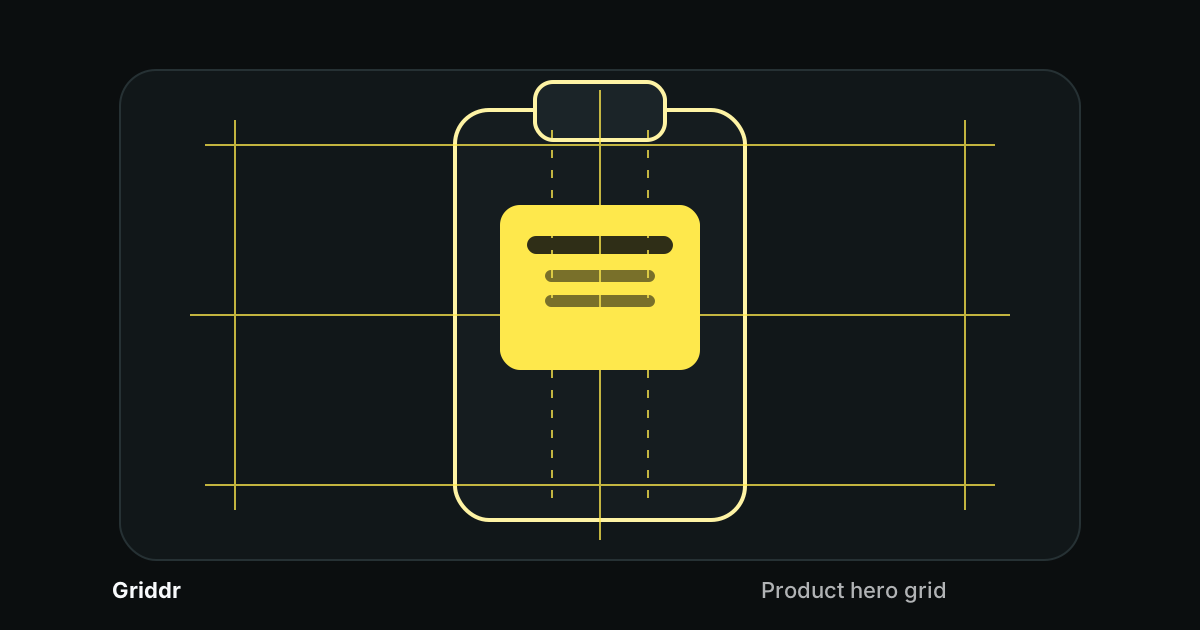
In Griddr, build a custom grid called Product hero:
- Add one vertical line at 50%.
- Add one horizontal line at 50%.
- Add vertical safe-margin lines at 12% and 88%.
- Add horizontal safe-margin lines at 15% and 85%.
- Add two optional vertical label rails at 40% and 60%.
The 50% lines give you the product axis. The outer lines keep the product away from the crop. The label rails give you a quick check for bottles, boxes, jars, cans, and any package where the front text matters.
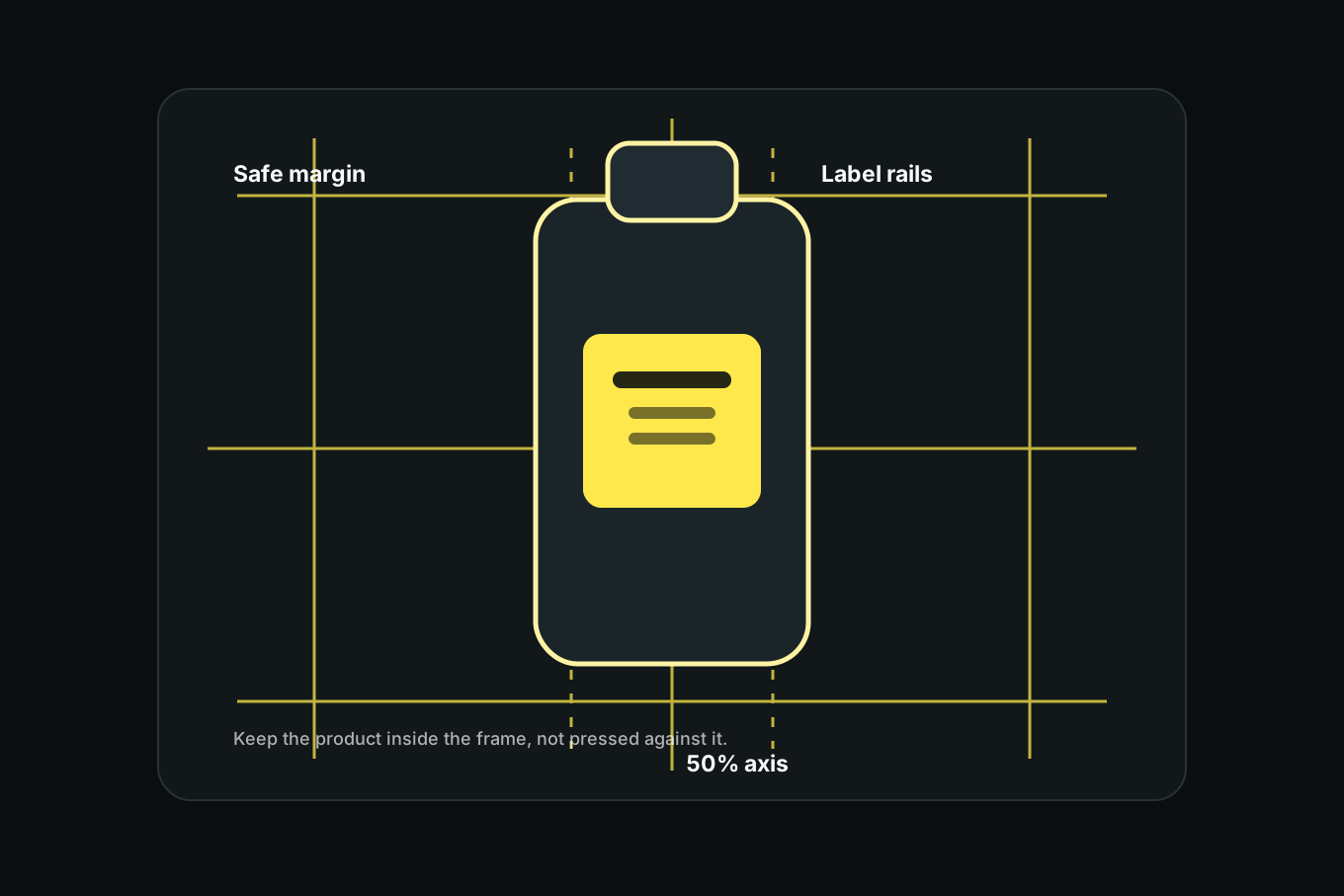
This grid is not magic. It is just a set of decisions you do not have to remake every time you shoot.
Shoot the five angles with the same rules
For each product, shoot five frames. Keep the product inside the safe-margin box every time.
1. Straight-on hero. The label faces the phone. The product's vertical center sits on the 50% line. The top and bottom leave similar breathing room.
2. 45-degree angle. Rotate the product, not your whole setup. Keep the product's visual center near the middle line and watch that the front label still reads.
3. Back label. Same distance, same height, same margin. This is where a grid saves the set from feeling patched together.
4. Detail close-up. Move closer, but keep the detail inside the safe-margin box. If the close-up fills the frame edge to edge, it will feel accidental when cropped into a card.
5. Scale shot. Add a hand, shelf, bag, or familiar object, but keep the product anchored. The supporting object can break the grid. The product should not.
If you are shooting a full catalog, save this grid and reuse it across the whole batch. It is the same idea as matching composition across a photo series, but stricter: the product is the series.
The label test
Before you take the photo, ask one brutal question: can I read the important part of the label in the viewfinder?
If the answer is no, fix the frame before editing. Common fixes:
- Move the phone a little lower so the label faces the lens.
- Step back and use the 1x lens instead of pushing the wide lens too close.
- Turn the product until the label edges run parallel to the grid.
- Reduce empty space above tall packaging.
- Use a darker or lighter grid color if the overlay disappears against the product.
The label rails are useful because they make label skew obvious. If the left edge of the label leans away from the rail, the product is rotated or the phone is off-axis. Fix that while shooting. Cropping later cannot restore a distorted label.
Product photos fail quietly: one crooked label, one tight crop, one shadow hiding the thing someone came to inspect.
Keep the boring variables boring
The grid controls framing. It does not control everything else. For a clean product set, keep these variables boring too:
Distance. Mark where the product sits and where your phone sits. A piece of tape on the table is enough.
Height. Keep the lens at the middle of the product for straight-on shots. Eye-level for a bottle. Slightly above for flat packaging. Directly overhead for flat lays.
Light. Use one main light source. Window light from the side is usually better than overhead room light. Mixed light makes colors hard to match across products.
Background. Choose one surface and stick with it. If you need variety, change props after you capture the clean listing set.
Crop. Leave margin first, crop second. The safe-margin lines give you room for square thumbnails, app-store cards, and social posts.
When to use a different grid
The product hero grid is best for single products and packaging. It is not always the right tool.
Use a 4x4 rectilinear grid when the product is flat and rectangular: prints, notebooks, cards, posters, fabric, labels, or anything where edges need to stay square.
Use rule of thirds when the image is a lifestyle scene rather than a listing shot. A candle on a table next to a book can live on a third. A candle on a product page probably wants to sit centered and clean.
Use a custom reference grid when the same product must be photographed after a change: new packaging, a refill, a seasonal label, or a before-and-after comparison.
Common product photo mistakes
Centering the product but not the label. Tall bottles often look centered while the label drifts. Align the label first; the bottle shape can be slightly imperfect.
Cropping too close. Tight photos look large in the camera roll and cramped everywhere else. Leave the safe margin.
Changing angle between SKUs. One jar shot from slightly above and the next from straight on makes the catalog feel inconsistent. Save one setup and repeat it.
Letting props steal the frame. Props are useful in lifestyle shots. In listing photos, they should support the product, not compete with it.
Fixing skew in post. You can straighten a small mistake. You cannot fix a phone that was too close, too high, and angled down at a label.
Product photography with a phone is mostly a discipline problem. The phone can take the picture. The grid makes the picture repeatable. Once you have a saved frame for product heroes, every new SKU starts from the same visual system instead of another round of guesswork.
Related reading
Shoot this with Griddr
Get Griddr — free on iOS & Android